
The Focused Desk: Simple & Affordable Study Table Setups
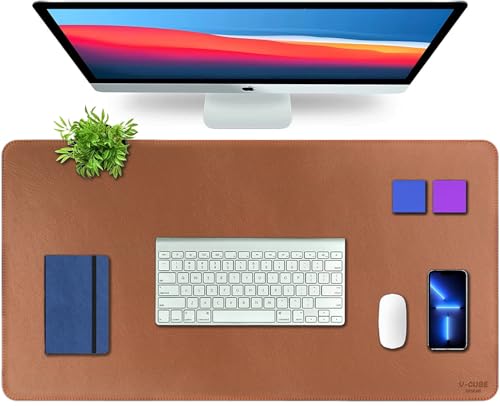
1. The V-Cube Vegan Leather Desk Mat: A Premium, Wipe-Clean Desktop Anchor
Spreading a laptop and mouse directly onto a bare, cold wooden desk can scratch the furniture surface and create distracting sliding noises while you try to study. This thick, 2.4mm padded vegan leather mat instantly solves that frustration by giving your entire workspace a soft, protective, and premium layer. The expansive 90X45cm tan layout acts as a beautiful, grounding visual anchor that keeps your laptop and keyboard perfectly stable during long working hours. Best of all, its splash-proof coating lets you effortlessly wipe away accidental coffee spills or water drops in under five seconds, giving you a clean, sleek, and distraction-free workspace on a budget.
1. Full Desktop Shield: The large 90x45cm leather mat easily holds your laptop, mouse, and notebook, protecting your wooden table from scratches and ink stains.
2. Cushioned Comfort: A 2.4mm thick padded leather layer offers a soft resting surface for your hands while typing or studying for long hours.
3. Double-Sided Reversible Use: Fully usable and identical on both sides, allowing you to flip it over for a fresh, clean surface anytime.
4. Wipe-Clean Shield: The splash-proof, anti-slip surface traps coffee spills and water rings, letting you clean up messes instantly with a damp cloth.
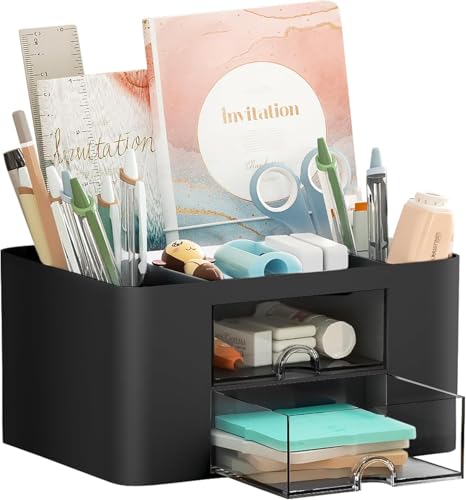
2. The Shuttle Art 5-Compartment Desk Organizer: Decluttering Your Workspace Essentials
Allowing loose pens, highlighters, and stray sticky notes to lie scattered across your desk completely ruins your studying momentum. This smart, compact plastic organizer solves that problem beautifully by dividing your daily stationery into distinct vertical boundaries. Featuring a mix of deep open-air slots and private drawers, it keeps your high-frequency tools visible while completely hiding tiny visual clutter like paper clips and staples. Its lightweight, scratch-resistant frame slips comfortably into tight table corners, maximizing your physical workspace without ever crowding your laptop layout.
1. High-Capacity Sorting: Features 5 open compartment zones that keep high-frequency pens, markers, and scissors perfectly upright and right at your fingertips.
2. Hidden Clutter Shield: Equipped with 2 smooth pull-out drawers to neatly hide away small loose items like paper clips, staplers, and pins.
3. Wipe-Clean Durability: Built from lightweight, scratch-resistant plastic that handles daily study wear and wipes clean of ink smudges in seconds.
4. Compact Footprint: Fits comfortably into tight desk corners or narrow shelves, maximizing your workspace without crowding your laptop layout.

3. The AERYS Smart Digital Alarm Clock: A Distraction-Free Study Timekeeper
Keeping your smartphone flat on your study desk to continuously check the time is an immediate trap that invites instant social media scrolling and disrupts your deep-focus work. This sleek, battery-operated digital clock solves that study-room dilemma perfectly by keeping you completely on schedule without a single digital screen notification. The large, bold digital interface tracks the time, calendar date, and your room’s ambient temperature inside a single, neat visual boundary. Finished with a clever automatic light sensor that turns on a faint, eye-safe glow only when your workspace goes dark, it provides crisp, distraction-free timekeeping right at the edge of your desk mat.
1. Accurate All-in-One Data: Displays the time, full calendar date, and live room temperature at a single glance, keeping you perfectly on schedule during study sessions.
2. Smart Eye-Safe Auto-Sensor: Automatically turns on a very soft, faint background glow the moment your room gets dark, protecting your eyes without harsh light glare.
3. Genuinely Gentle Wakeups: Features a smart three-step crescendo buzzer that starts softly and increases in volume gradually to wake you up without any jarring morning shocks.
4. Cordless Minimalist Profile: Operates entirely on three standard AAA batteries without any messy power wires running across your table layout, keeping your setup clean and wire-free.
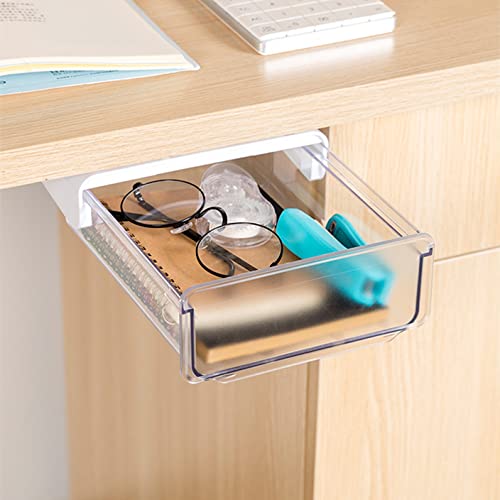
4. The oddpod Premium Under-Table Hidden Drawer: Reclaiming Invisible Desktop Footprints
When small daily utilities like earphones, sticky notes, and phone charging blocks stack up on your primary workspace, they rapidly choke your open writing area and create massive visual fatigue. This low-profile under-desk acrylic drawer solves that space dilemma brilliantly by creating an invisible, slide-out vault hidden completely beneath your tabletop slab. It mounts seamlessly using heavy-duty, double-sided industrial adhesive strips, locking firmly onto any flat wood or glass surface without requiring a single drilling screw or tool. The smooth-glide track pulls open effortlessly to keep your high-frequency personal gear completely dust-free, turning the unused empty space beneath your table into high-utility organization.
1. Invisible Storage Maximizer: Mounts completely hidden beneath your flat desk surface, clearing away personal gear like phones, keys, and cables to free up 100% of your open writing area.
2. Tool-Free Sticky Assembly: Installs in less than two minutes using included high-strength adhesive pads, binding firmly to your table bottom without any complex drilling or structural damage.
3. Smooth-Glide Private Access: Features a flat-front structural plastic chassis that slides open silently and smoothly, keeping your stationery protected from ambient room dust.
4. Sized for Compact Tables: Designed at an optimized 20 x 17 x 7.2 cm profile, it delivers high-capacity internal space while remaining low-profile enough to never bump your knees.
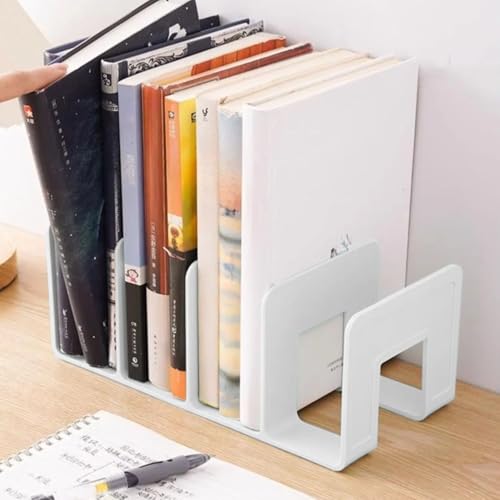
5. The Apexx Desktop Book Stand: Vertical Stability for Heavy Textbooks
Propping thick reference books or open study notebooks flat against your desk mat eats up massive table space and forces you into an uncomfortable, neck-straining slouch. This heavy-duty desktop document rack solves that posture dilemma beautifully by holding your active files and textbooks perfectly upright. Built with a rigid, warp-resistant framework, it stands completely solid and stable under the heavy weight of dense academic volumes or multiple files. Slotted right onto the corner of your desk, it transforms scattered workspace stacks into a neat vertical row, leaving your center table open and completely clutter-free.
1. Vertical Space Saver: Shifts thick textbooks from flat table surfaces into a tidy vertical row, freeing up instant desk space.
2. Rock-Solid Foundation: Engineered with a rigid, heavy-duty framework that supports dense reference volumes without bowing or sliding.
3. Ergonomic Reading Angle: Keeps active textbooks upright, keeping pages fully visible to eliminate neck strain.
4. Universal Workspace Slot: Features a low-profile, versatile frame that fits easily into tight study corners or deep shelves.
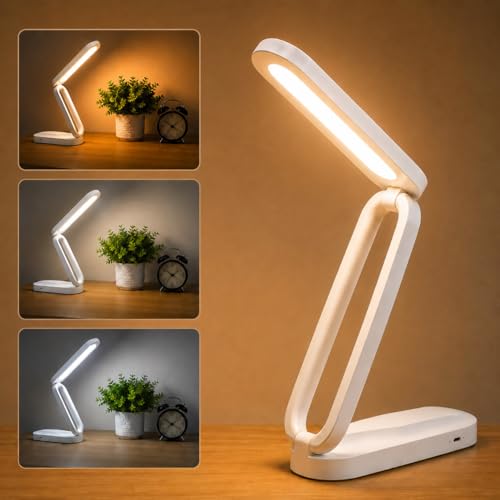
6. The Fulminare Eye-Caring LED Desk Lamp: Smart Lighting for Deep-Focus Study
Relying on harsh overhead room tubes or dim bulbs for late-night study sessions causes immediate eye strain and drains your reading stamina. This modern, touch-controlled desk lamp resolves that fatigue completely by diffusing a completely flicker-free, anti-glare light across your workspace. It features an intelligent memory chip that instantly recalls your favorite brightness level the split-second you turn it on, saving you from constant resetting. Sleek, energy-efficient, and adjustable, it anchors quietly at the edge of your desk mat to cast target illumination right where you need it most.
1. Anti-Glare Eye Protection: Emits a soft, flicker-free light guide panel that eliminates ghosting shadows to stop study eye fatigue.
2. 3 Custom Color Modes: Toggle easily between crisp 6000K Work mode, balanced 4500K Reading light, and warm 3000K Relaxing glow.
3. 7-Level Groove Dimmer: Swipe your finger smoothly across the integrated touch track to pick the exact brightness your room needs.
4. Eco Smart Memory: Remembers your exact last-used light setting automatically while consuming up to 80% less power than old bulbs.
Frequently Asked Questions
1: What is the ideal light color temperature for a student study table to prevent eye strain?
Answer: For maximum focus and zero eye fatigue, you should avoid standard warm yellow lights (3000K), which induce sleepiness, as well as harsh blue-white lights (6500K) over long periods. The sweet spot for extended reading and writing is a cool daylight or neutral white tone around 4000K to 4500K. This temperature mimics natural morning light, which keeps your brain alert, improves text contrast on paper, and reduces optical glare without straining your eye muscles.
2: How can I organize a very small or narrow study desk without cluttering the surface?
Answer: When desktop surface space is limited, you must shift your storage strategy from horizontal to vertical. Instead of letting items sit flat, use a multi-tier pen caddy to stack stationery upward, and deploy an under-table hidden sliding drawer to claim the empty, invisible space beneath your desk slab. Additionally, grounding your setup with an extended desk mat visually zones your workspace, preventing items from scattering aimlessly across the table.
3: Where should I position my desk lamp to eliminate annoying hand shadows while writing?
Answer: To prevent your own hand from casting a dark shadow over your notebook while you study, always position your desk lamp opposite to your dominant writing hand. If you are right-handed, place the lamp on the front-left corner of your desk; if you are left-handed, anchor it on the front-right corner. Ensure the lamp head is angled slightly downward and away from your direct sightline to eliminate reflective glare from screens or glossy pages.
4: Will using a large faux leather desk mat make my mouse lag or cause tracking errors?
Answer: Not at all. High-quality faux leather desk mats are engineered with a uniform, micro-textured surface specifically optimized to reflect optical and laser mouse sensors perfectly. They provide a precise, high-friction glide that actually improves tracking accuracy and stops jerky cursor movements compared to a raw, glossy glass or polished wooden tabletop. It completely eliminates the need for a separate, small cloth mouse pad while remaining 100% smooth for gaming or daily document scrolling.
5: How do I choose between an under-table adhesive drawer and a regular desktop organizer box?
Answer: If your study table is incredibly narrow or short on surface area, prioritize a self-adhesive under-table hidden drawer first to maximize your open workspace for laptop typing or open notebooks. If you use a wide variety of daily instruments like multiple highlighters, scissors, and sticky notes, opt for a multi-compartment desktop pen stand to keep everything immediately visible. For the ultimate layout, blend both: use the desktop box for high-frequency stationery and the hidden drawer to clear away flat items like earphones, cables, and smartphones.
